Accurate every month, with no one curating lists by hand
The consortium brings universities together with the U.S. Space Force to research space technology. Its work runs through five research initiatives, each led by one university with others as partners.
Each initiative publishes calls for proposals that open and close on a funding cycle. The site had to present all five, more than 30 universities, news, guides and live calls, and stay accurate as those change every month.
Publish once, and it shows up everywhere it belongs
The initiatives are the center of the CMS. News, calls and quotes each point to the initiative they belong to, so every initiative page lists its own items. Publishing a story with an initiative selected puts it on that page.
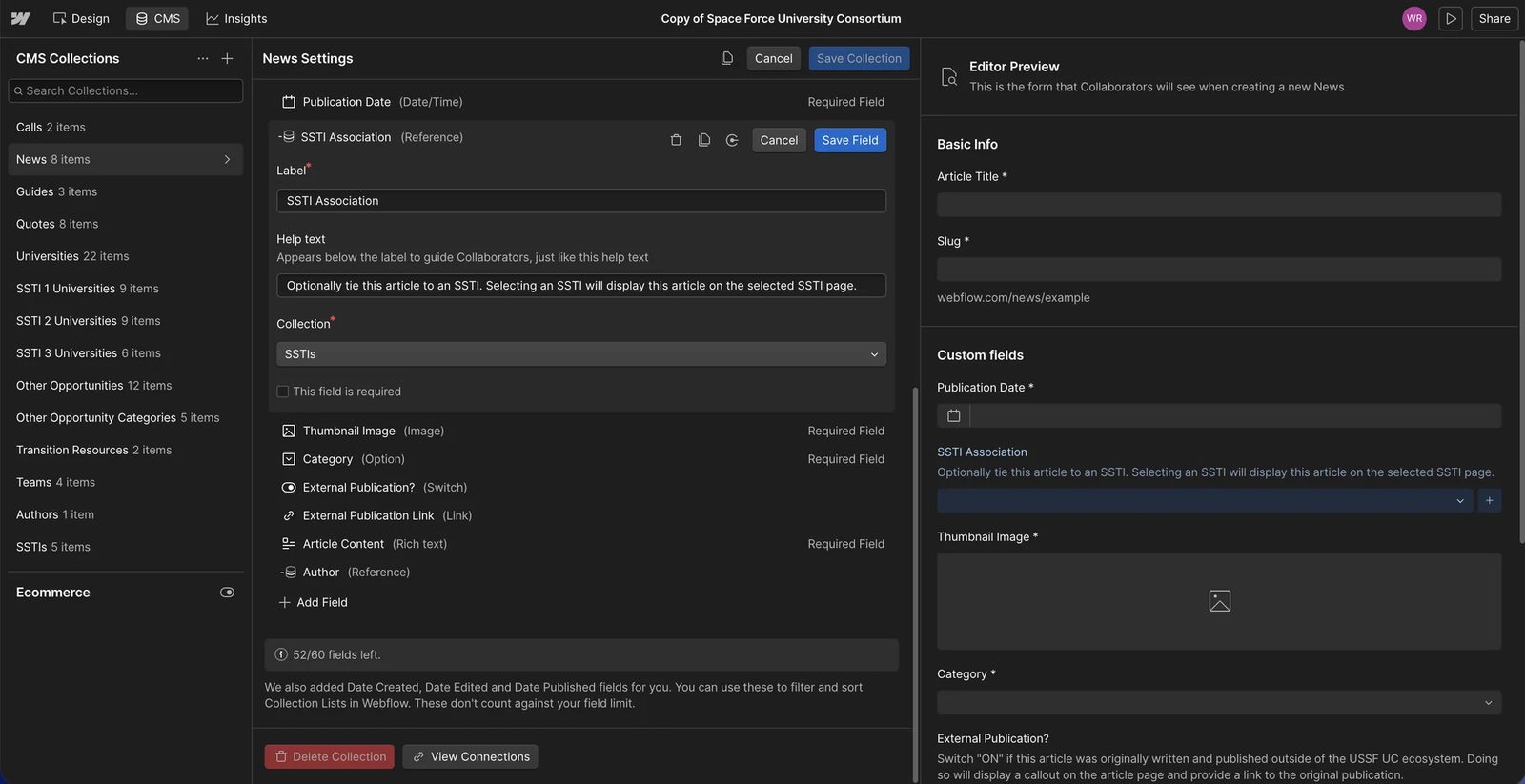
1Every collection in one list. News, calls and quotes all point back to an initiative.
2The initiative reference, with help text written for the editor who fills it in.
3The live preview of the article the editor is writing.
One profile per university, reused everywhere
A university’s role differs by initiative, and a plain reference can’t store that. So each initiative has a small join collection holding the university, whether it leads or partners, and what it contributes.
The same records drive the map on each initiative page. Adding a partner is one new item, and the list and the map both update.
| Field | Type | Help text the editor sees | Collection |
|---|---|---|---|
| SSTI association | Reference | “Optionally tie this article to an SSTI. Selecting an SSTI will display this article on the selected SSTI page.” | News |
| Featured? | Switch | “Toggle ON to display this quote on the home page. The home page quote section is limited to two quotes. If more than two quotes are featured, the two most recent quotes will display.” | Quotes |
| External publication? | Switch | “Switch ON if this article was originally written and published outside of the USSF UC ecosystem. Doing so will display a callout on the article page and provide a link to the original publication.” | News |
| Location | Text | “Format [city], [state]. Ex. Nashville, TN” | Universities |
Help text quoted from the Webflow project. Optional parts of a template, like the initiative chip on an article, only show when their field is set.
A clear way in for each audience
Each visitor gets an entry point placed where they’re already reading. The contact page switches its pitch and its fields by audience.
Researchers
When does the next call open? Live calls on every initiative, plus text and email alerts.
Open callsProgram offices
A request for a briefing, asked for by department and role.
Request a briefPress
A news room with stories filtered by initiative.
News roomEveryone else
A person to talk to, with the form shaped to who’s asking.
Contact
Small details from a launch, kept out of the content’s way
On desktop, crosshairs follow the cursor and a corner readout gives its position and a mission clock. All of it switches off on touch screens.
The altitude gauge on the left climbs as you scroll: one native Webflow scroll interaction on a component, used on 7 pages.
Loaded once site-wide, and switched off below 768px or without a fine pointer.